Quick Reference Guide: Positive Pay - Issued Item File Activity
Overview
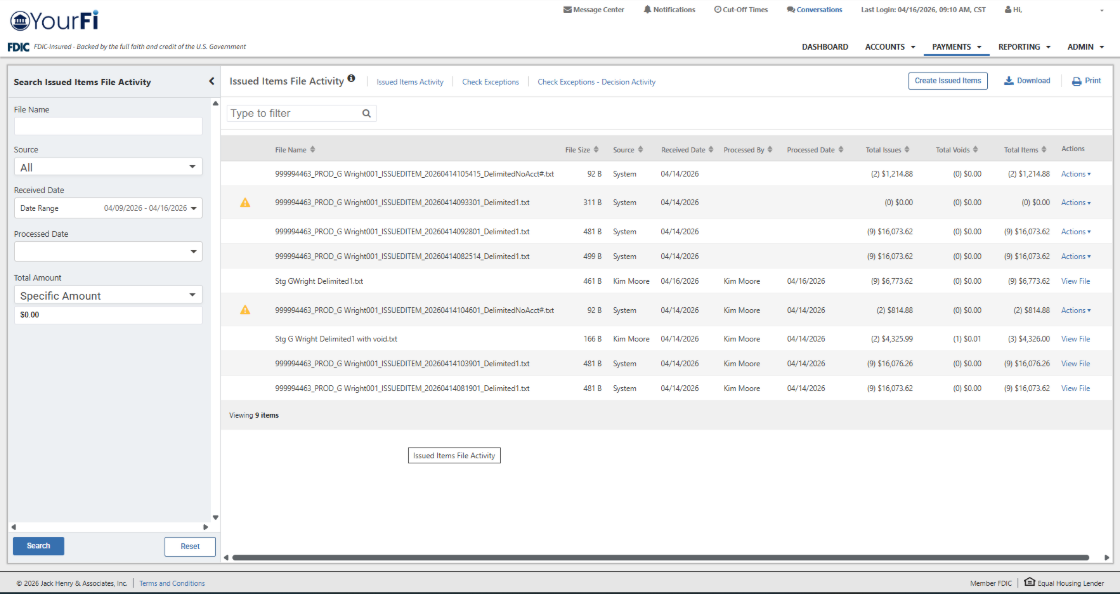
The Issued Items File Activity page provides Treasury Management customers with a centralized view to monitor and research check issue item files uploaded or transmitted to financial institutions. By providing direct access to history and file contents, this self-service tool enhances operational efficiency for both the customer and the institution.
Benefits
Benefits for Banks
- Issued Items File Activity is available to customers and allows them to be self-sufficient in researching information.
- The self-service functionality reduces call volume for financial institutions.
Benefits for Customers
- Enhanced Self-Sufficiency: Customers can research file details and statuses independently through robust, flexible search features without needing to contact their institution.
- Discrepancy Research: If a check is flagged as an exception, users can view the raw file data to verify exactly what information was originally transmitted.
- Independent Reporting: Users can generate and download reports in PDF or CSV formats or print records directly from the platform.
- Rapid Error Resolution: Files that encounter processing issues are flagged with an error icon. Clicking the error icon displays a modal with specific details, allowing for faster troubleshooting.
Channel User Access
Once the appropriate entitlements have been granted, the customer will see the following navigation:
Issued Items File Activity: Navigate to Payments > Positive Pay. Channel customers will see the option for Issued Items File Activity.
Search and Filter Capabilities
The interface is designed for quick data retrieval through several methods:
- Advanced Search: Filter results by Source, File Name, Received Date, Processed Date, or Total File Amount.
- Dynamic Filtering: The “Type to Filter” field allows users to search for any character or numeric string across all columns simultaneously.
- Default View: The system automatically displays the last seven days of activity, prioritizing unprocessed files at the top for immediate attention.
- Error Icon: Files that encounter processing issues are flagged with an error icon. Clicking this icon displays a modal with specific details, allowing for faster troubleshooting.
Integrated Workflow
- Transmission Monitoring: Users can review both current-day transmissions and historical file activity.
- Manual Entry Access: A Create Issued Items option is available to quickly navigate to the manual entry workflow if a file upload is not preferred.
- Raw Data Access: The View action allows customers to inspect the raw file data for precise verification.
Note: While standard uploads are included, SFTP File Transmission is an optional add-on feature requiring a separate contract.