Quick Reference Guide: Intuit Connection Types
Overview
Treasury Management has enhanced the platform to support QuickBooks® and Quicken® functionality. At the present time,Treasury Management only supports download functionality. Treasury Management does not support Transfer and Bill Pay.
Benefits
Benefits for Banks
- Additional integration features for your customers.
Benefits for Customers
- Ability to export transaction and balance information out of Treasury Management and import into Intuit.
3 connection types for Intuit Products
Express Web Connect:
Supports one-way (manual download by the user) communications to aggregate data.
- Is used in conjunction with QuickBooks Online and is an aggregation service (screen scraping) model that gathers account transaction information from the Treasury Management platform to be imported into QuickBooks or Quicken.
- Support of this functionality is between financial institutions and Intuit. This is not contracted, nor supported by Jack Henry.
Web Connect:
Supports one-way (manual download by the user) communications to aggregate data.
- Is used in conjunction with the Intuit desktop software only and is an aggregation service (screen scraping) model that gathers account transaction information from the Treasury Management platform to be imported into QuickBooks or Quicken.
- QuickBooks - Customers can manually download their account transactions in a .qbo file which contains the necessary header record information, allowing the file to be imported into QuickBooks.
- Quicken - Customers can manually download their account transactions in a .qfx file which contains the necessary header record information, allowing the file to be imported into Quicken.
- Support of this functionality is between financial institutions and Jack Henry. A contract is required with Jack Henry for this connectivity.
Direct Connect:
Supports 2-way communication however, only 1-way (automated download) communications with Treasury Management is available.
- QuickBooks - Customers utilize Direct Connect for an automated login (utilizing user credentials) and download of Treasury Management account transactions (.qbo extension).
- A contract is required with Jack Henry for OFX Gateway connectivity and is for use with the Intuit desktop software only. Direct Connect requires a Web Connect contract.
- Support of this functionality is between financial institutions and Jack Henry.
Note: Currently, Direct Connect supports only one-way communications (download of transactional information). An Intuit contract is required for all financial institutions. Please contact your Sales Executive or Customer Relationship Manager for additional information.
Supported features currently available in Treasury Management
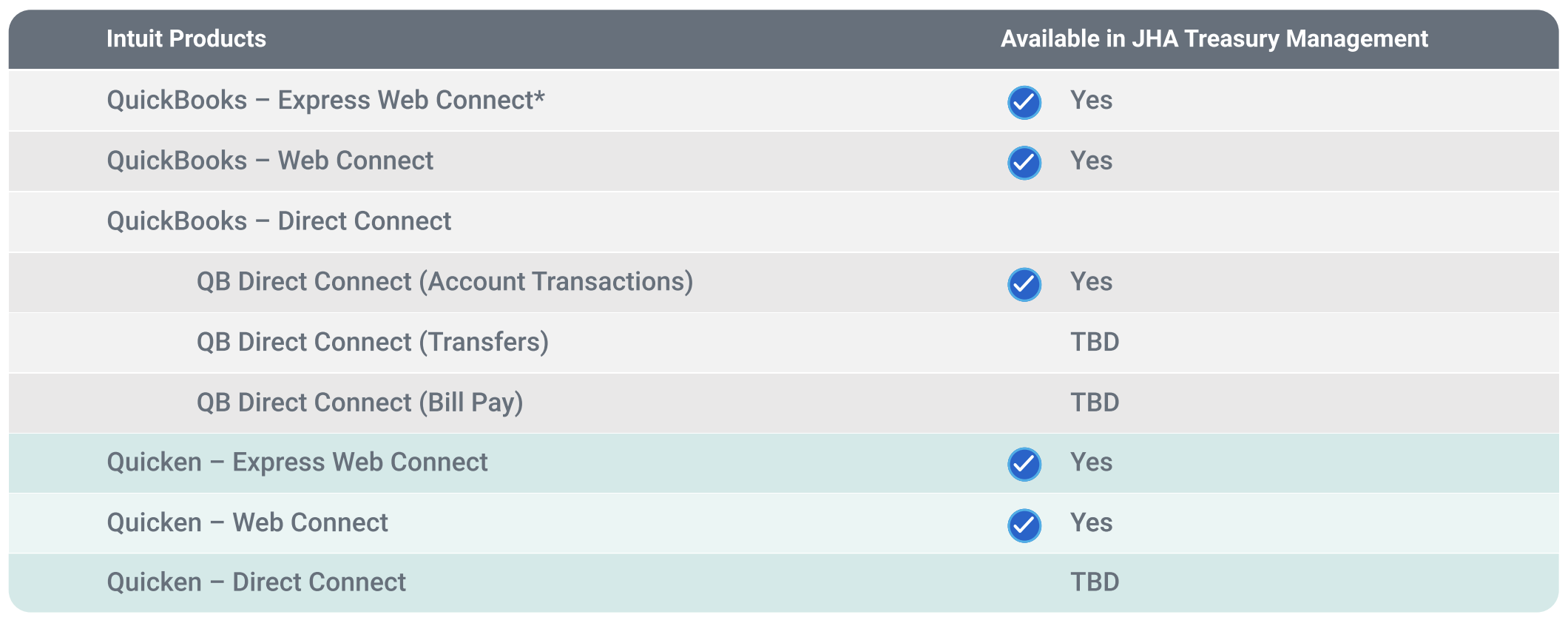
Important: 2FA at Login not supported.
Financial Institutions – Helpful Support Tips
Express Web Connect:
- Support of this functionality is between financial institutions and Intuit. This is not contracted with, nor supported by Jack Henry.
Web Connect:
- Support of this functionality is between financial institutions and Jack Henry.
Direct Connect:
- Support of this functionality is between financial institutions and Jack Henry.
- Jack Henry Support may request the Intuit log files for the Web Connect and Direct Connect connection types. The log files are essential and assist Jack Henry Support in triaging issues with the Web Connect and Direct Connect connection types. Screen captures are helpful however, they are not a replacement for the log files.
- Gather as much information upfront as you can from your customers which will help expedite the triage process.
- The Intuit Support site walks through the steps to obtain OFX logs via the following URL: https://www.intuit.com/partners/fdp/implementationsupport/ofx/support/log-file-location/
- Financial institutions have access to free desktop software versions of QuickBooks and/or Quicken. Jack Henry does recommend the financial institution download the free version to assist troubleshooting customer issues.
- The following are instructions to create a new Intuit account to login to the OFX website:

- Access via: https://www.intuit.com/partners/financial-institutions/professional-services/ofx/
- Click here for instructions
- Fill out the form > Click Create Account
- Once completed, the bank will be able to view the QuickBooks desktop software available to be downloaded
Miscellaneous
- For the contracted products (Web Connect and Direct Connect), support flows as follows:
- The financial institution is the first line of support.
- Jack Henry is the second line of support.
- Intuit is the third line of support.
- For the Cloud based versions and Express Web Connect connections, the support flow is:
- The financial institution is the first line of support.
- Intuit is the second line of support.
- In addition, financial institutions can open tickets directly with FI Intuit Support for Quicken, QuickBooks or QuickBooks Online via: https://www.intuit.com/partners/fdp/implementation-support/ofx/