Quick Reference Guide: Back Office Reports
Back Office Reports List
| Report Selection | Report Description |
|---|---|
| ACH File Upload Report | Lists all ACH files uploaded by the Upload Date, File Name, File Size and Source. The report also lists the total number of payments and a summary of the payments in each status as well as Total Debits and Credits per file. |
| ACH Payment Report | Lists all ACH Payments within the date period for the selected date type {Created, Initiated, or Effective) and companies. |
| ACH Recon Summary Report | Provides a summary of ACH payments by ACH Company for the selected date type {Created, Initiated, or Effective) and date period. The report also lists the total amount of debits and credits and payments by status. |
| Company Volume Report: Posted Transactions | Lists the number of ACH payments, Wire Payments, Transfers, Check Exceptions and ACH Exceptions by company. |
| Customer User Activity Report | Lists the User Name, Login ID, User Type and activity information for the selected users of the company. The current day will be used as the default for the activity period. Session ID, device, browser, and IP Address is additional information on the report. |
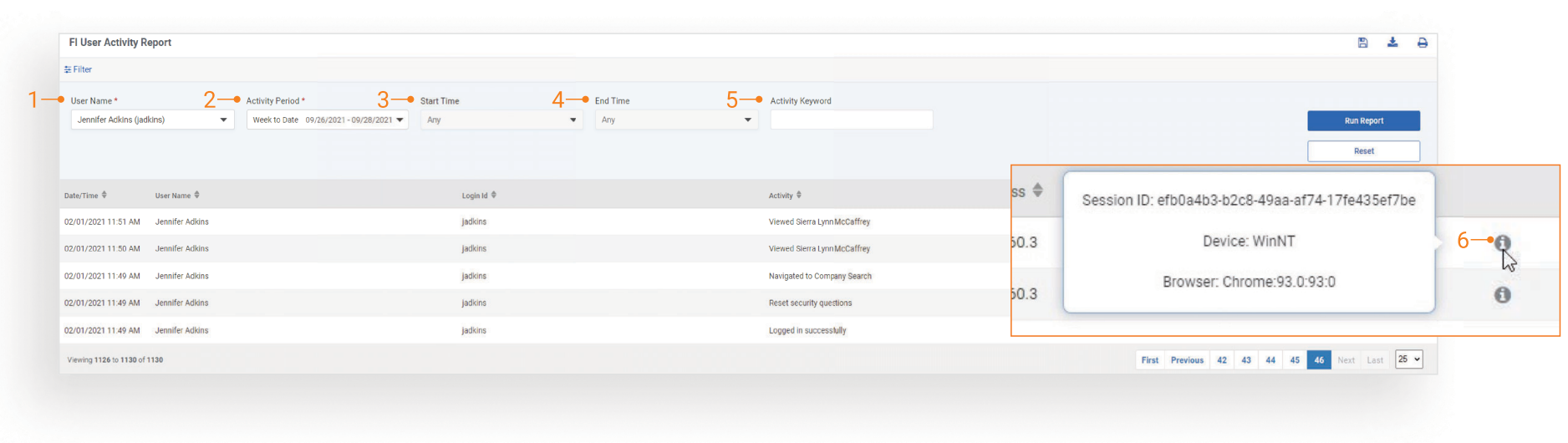
| Fl User Activity Report | Lists the User Name, Login ID, Login ID, Activity and IP address for the selected user during. Session ID, device, and browser is additional information on report. |
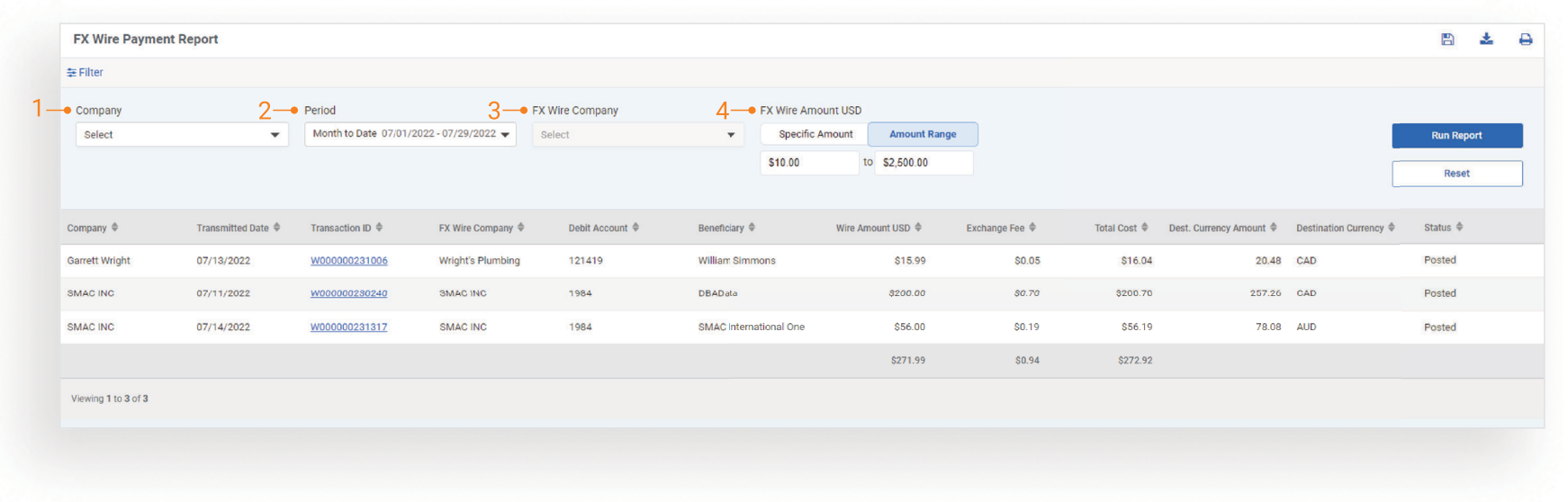
| FX Wire Payment Report | Lists the following payment information: Company Name, Transmitted Date, Transaction ID, FX Wire Company, Debit Account, Beneficiary, Wire Amount {USD), Exchange Fee, Total Cost, Destination Currency and Destination Currency Amount. Complete payment details, including audit information can be viewed by clicking the Transaction ID hyperlink. |
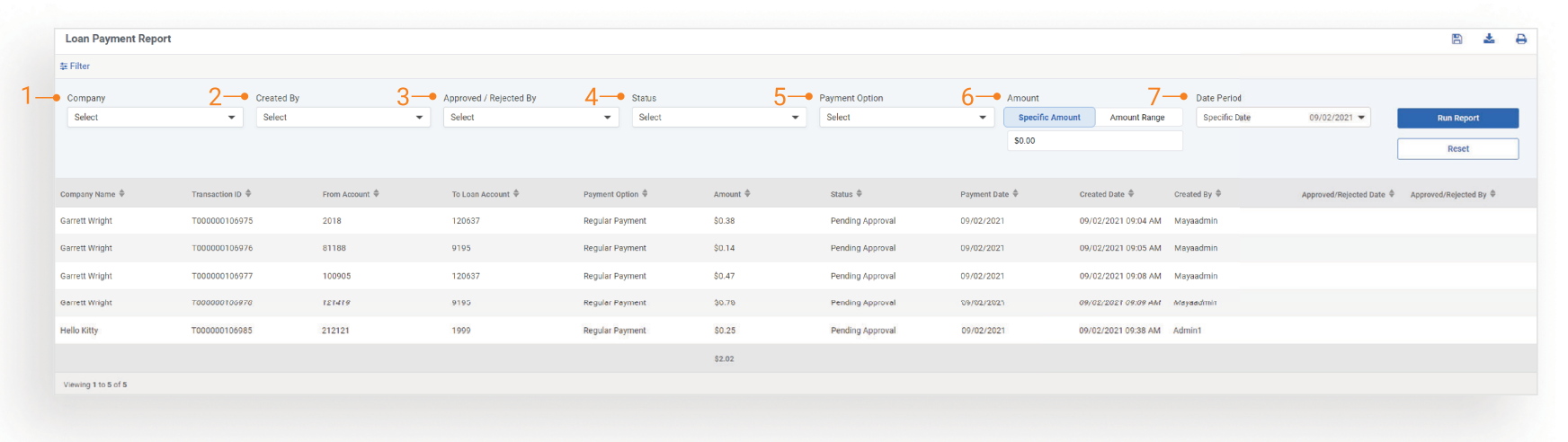
| Loan Payment Report | Lists the Company Name, Transaction ID, From Account, To Loan Account, Payment Option, Amount, Status, Payment Date, Created Date, Created By and approval information based on the selected search criteria. If no filter criteria is selected the results show all loan payments for all companies for the current date. |
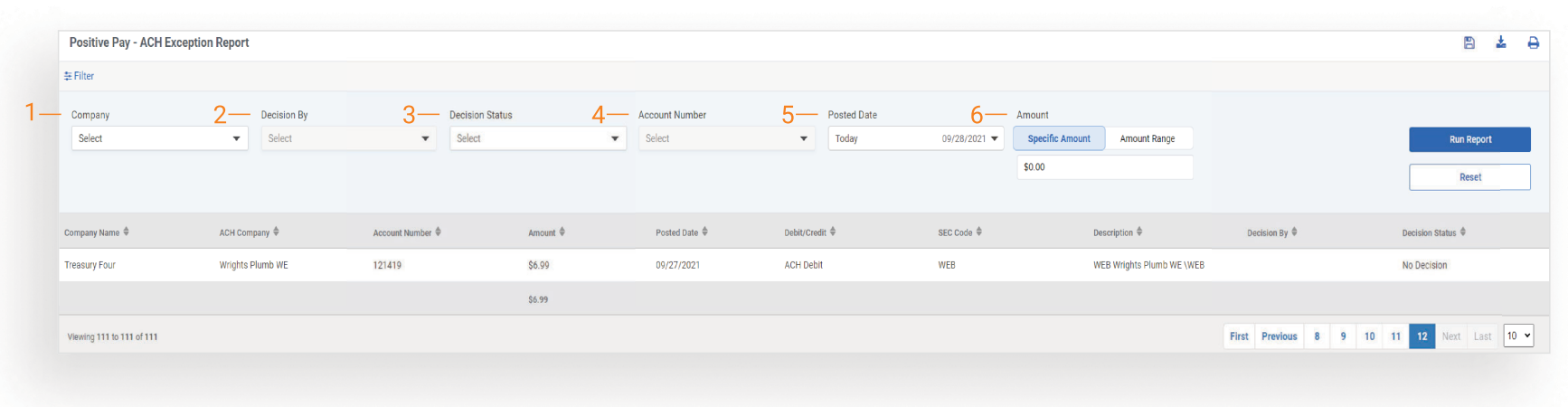
| Positive Pay - ACH Exception Report | Lists the Company Name, ACH Company, Account Number, Amount, Posted Date, ACH Type {Debit/Credit), SEC Code, Description, Decision By and Decision Status all ACH exceptions based on the selected criteria. If no filter criteria is selected the results show all ACH exceptions for all companies for the current date. |
| Positive Pay - Check Exception Report | Lists Check Number, Paid Amount, Issued Amount, Posted Date, Issued Date, Issued Payee, Exception Reason, Return Reason and Decision status for the selected company and accounts. |
| Positive Pay Issued Items Report | Lists Company, Name, Created By, Item Type, Item Status, Account Number, Check Number, Issued Date, Created Date, Check Amount, Payee and Audit Info based on the selected criteria. If no filter criteria is selected the results show all issued items for all companies for the current date. |
| Stop Payment Report | Lists Company Name, Account Number, Check Number, Amount, Check Date, Expiration Date, Payee, Status, Created By, Created Date and approval information based on the selected criteria. If no filter criteria is selected the results show all stop payments for all companies created for the current date. |
| Transfer Payment Report | Lists the Company Name, Transaction ID, From Account, To Account, Amount, Frequency, Transfer Date, Status, Created By, Created Date and approval information based on the selected criteria. If no filter criteria is selected the results will show transfer payments for all companies for the current date. |
| User Entitlement Report | Lists the Company Name, User Name, Login ID, Product. Account/Company and Entitlements based on the selected criteria. If no filter criteria is selected the results will show all product entitlements for all users by company. |
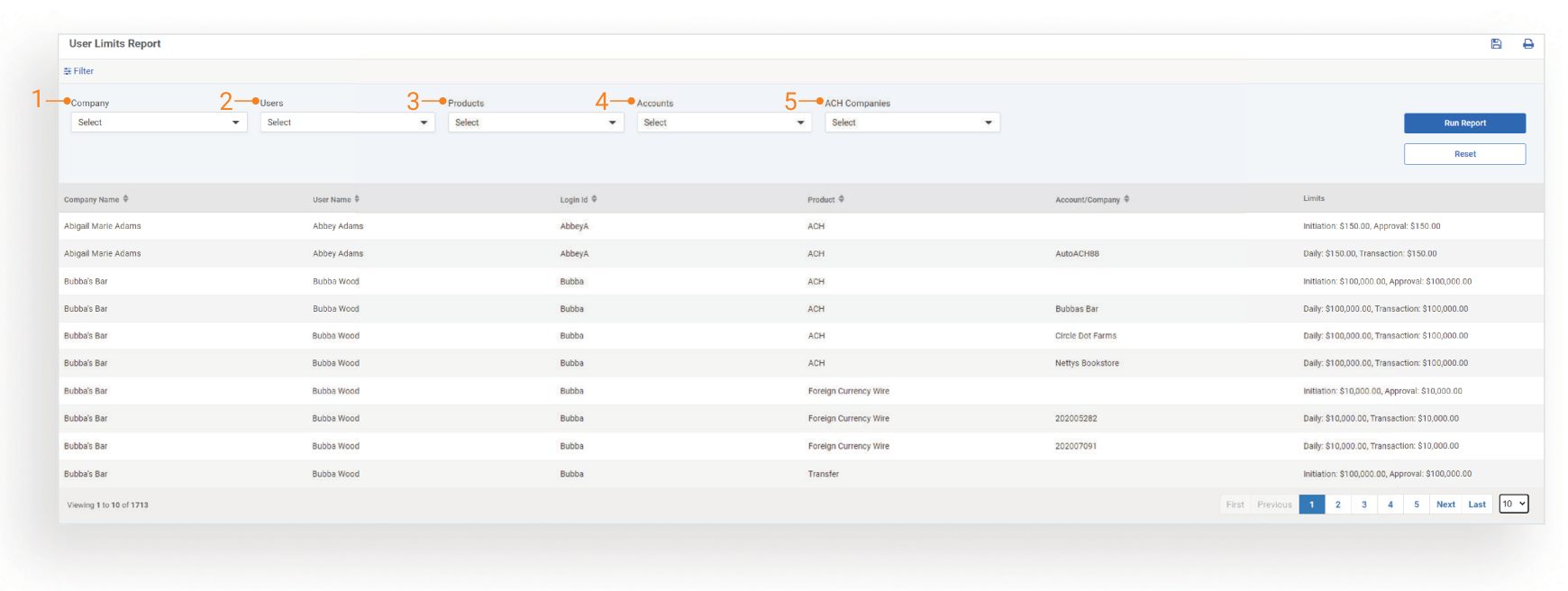
| User Limits Report | Lists the Company Name, User Name, Login ID, Product, Accounts/ ACH or Wire Company and Limits {daily, initiation, transaction and approval) based on the selected criteria. If no filter criteria is selected the results will show all user limits by company. |
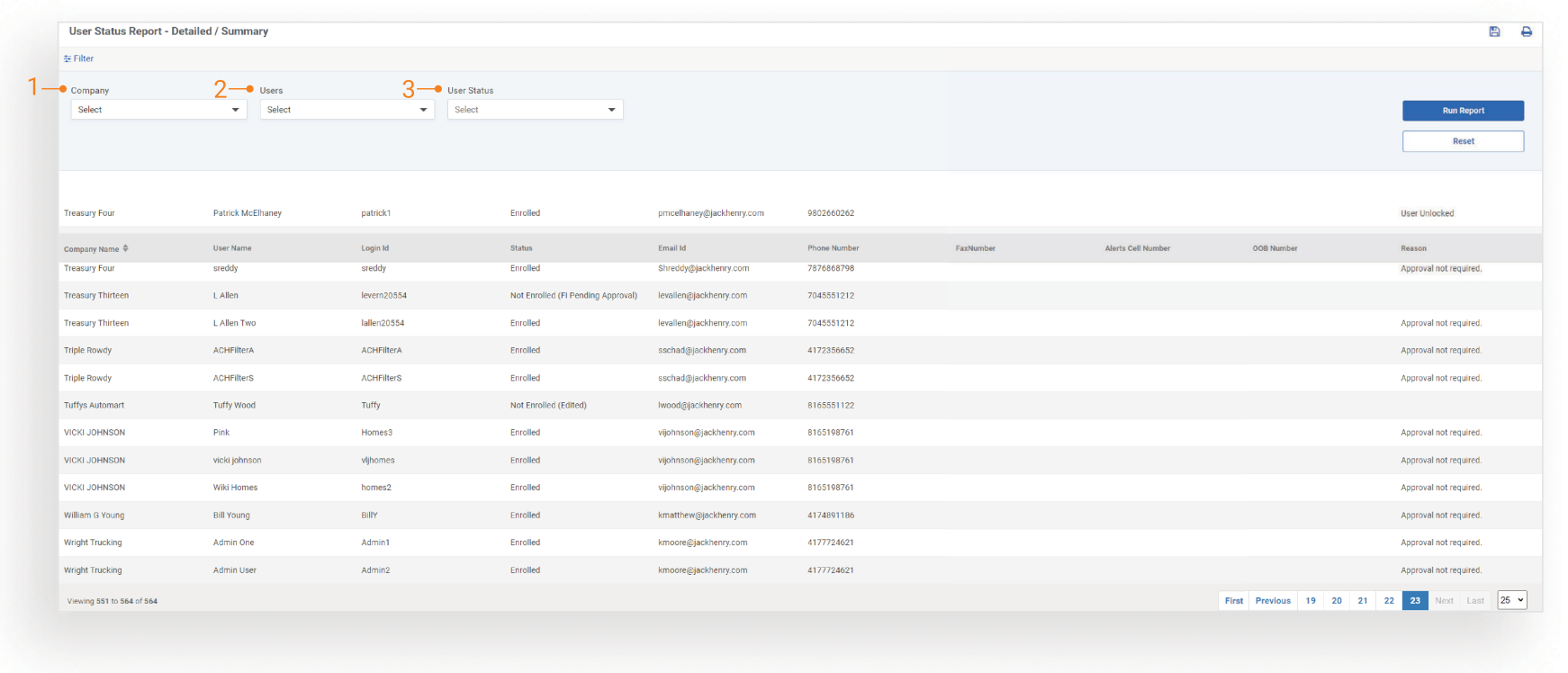
| User Status Report Detailed/Summary | Lists the Company Name, User Name , Login ID, Status, Email ID, Phone Number, Fax Number, Alerts Cell Number, 008 Number and Status based on the selected criteria. If no filter criteria is selected the results will show all companies by user. |
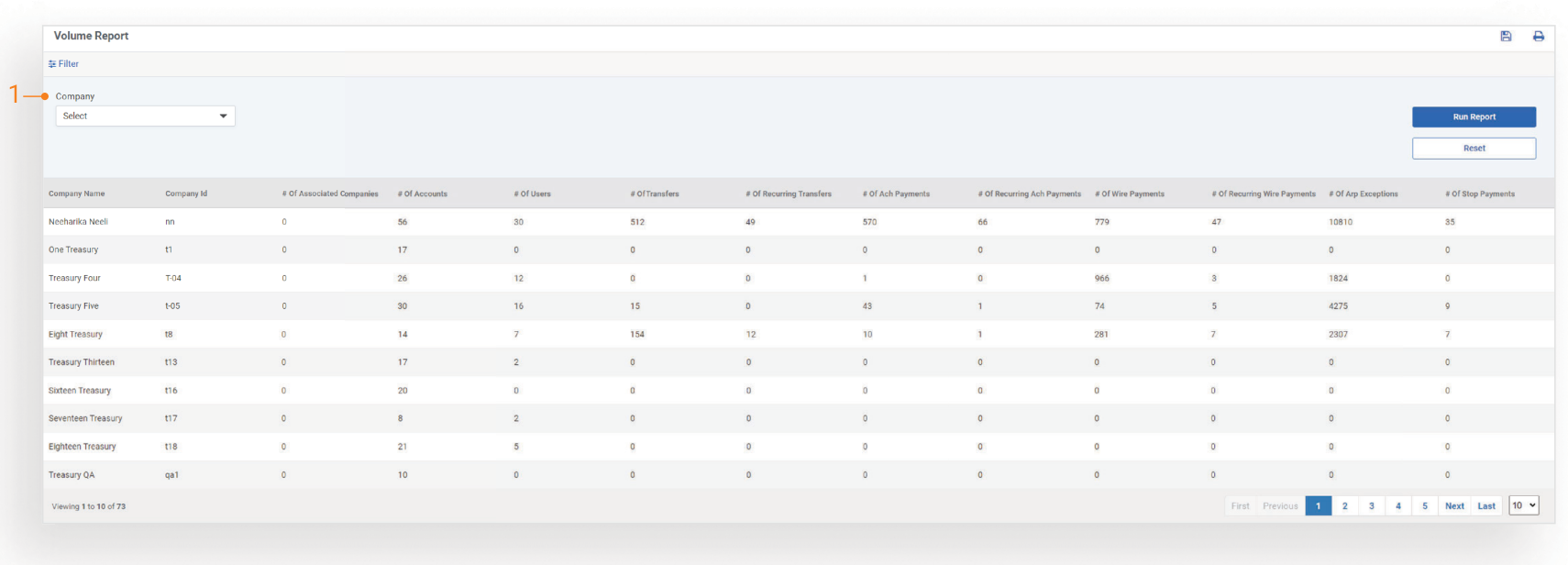
| Volume Report | Lists the Company Name, Company ID, along with the total number of Associated Companies, Accounts, Users, Transfers, ACH Payments, Wire Payments, Positive Pay Exceptions and Stop Payments for the selected company. |
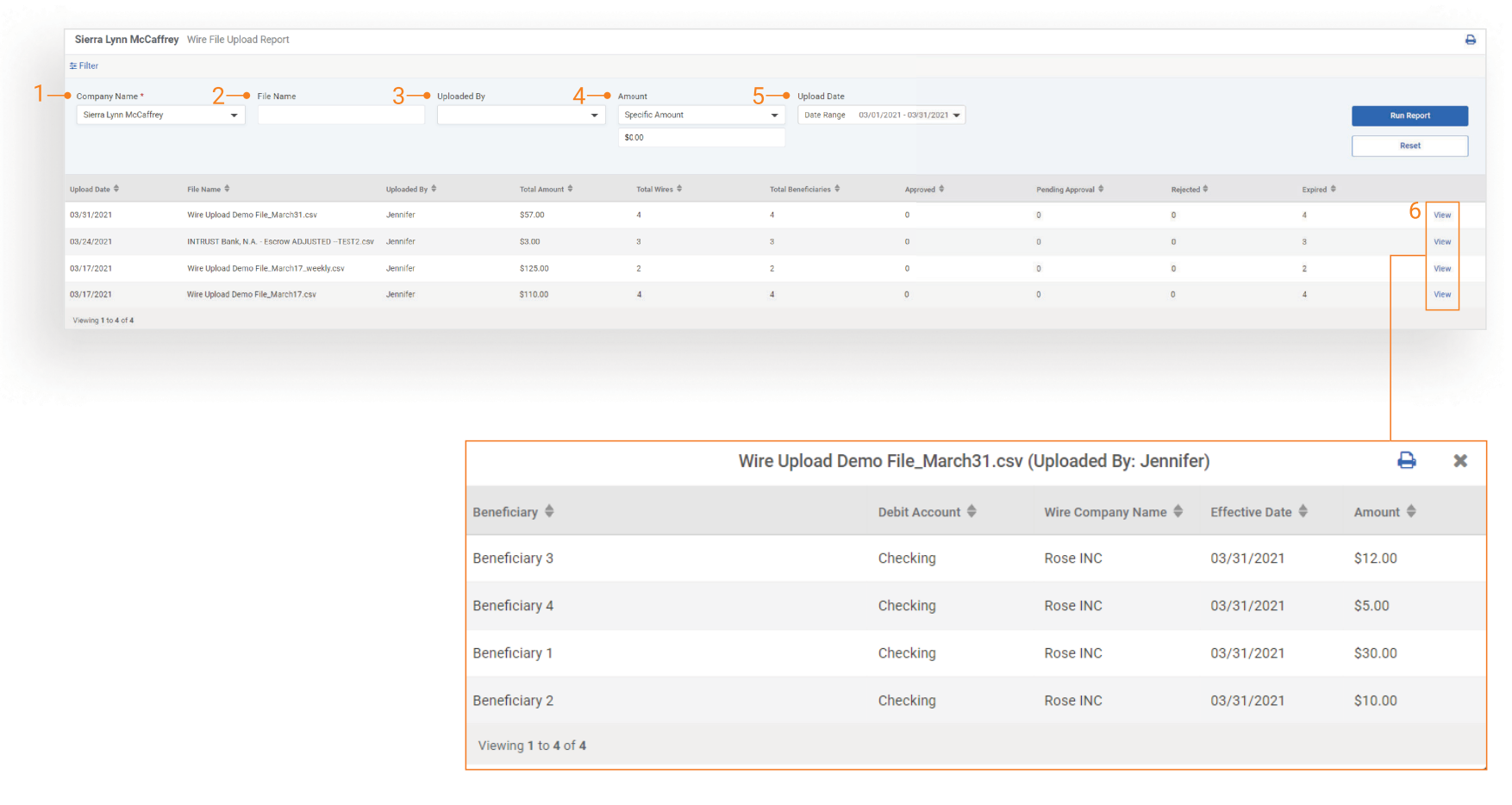
| Wire File Upload Report | Lists the File Name, Upload By, Total Amount along with the total number of wire payments in each status for the selected company. |
| Wire Payment Report | Lists all Wire Payments and associated summary information within the date period for the selected companies. Additional details, including audit information can be viewed by selecting the Transaction ID hyperlink. |
| Wire Recon Summary Report | Provides a summary of Wire payments by Wire Company including the total amount by status based on the selected criteria. If no filter criteria is selected the results will show all wire companies for the current date. |
| ACH Exceptions - Filter Rules | Lists Created Date, Filter Rule Name, Account, ACH Company Name, Company ID, SEC, Amount, Transaction Type, Filter Status, based on the selected criteria. On the rendered report, additional details about each filter can be viewed by selecting the DETAIL hyperlink. |
| ACH Notification of Change Report | Lists corrections notices received by Date Notification Received, Original Effective Date, Company, and ACH Company. If no filter criteria is selected the results will show correction notices for all companies for current date. |
| ACH Return Report | Lists return notices received by Date Return Received, Original Effective Date, Company, and ACH Company. If no filter criteria is selected the results will show return notices for all companies for current date. |
Back Office Reports Features
User Experience
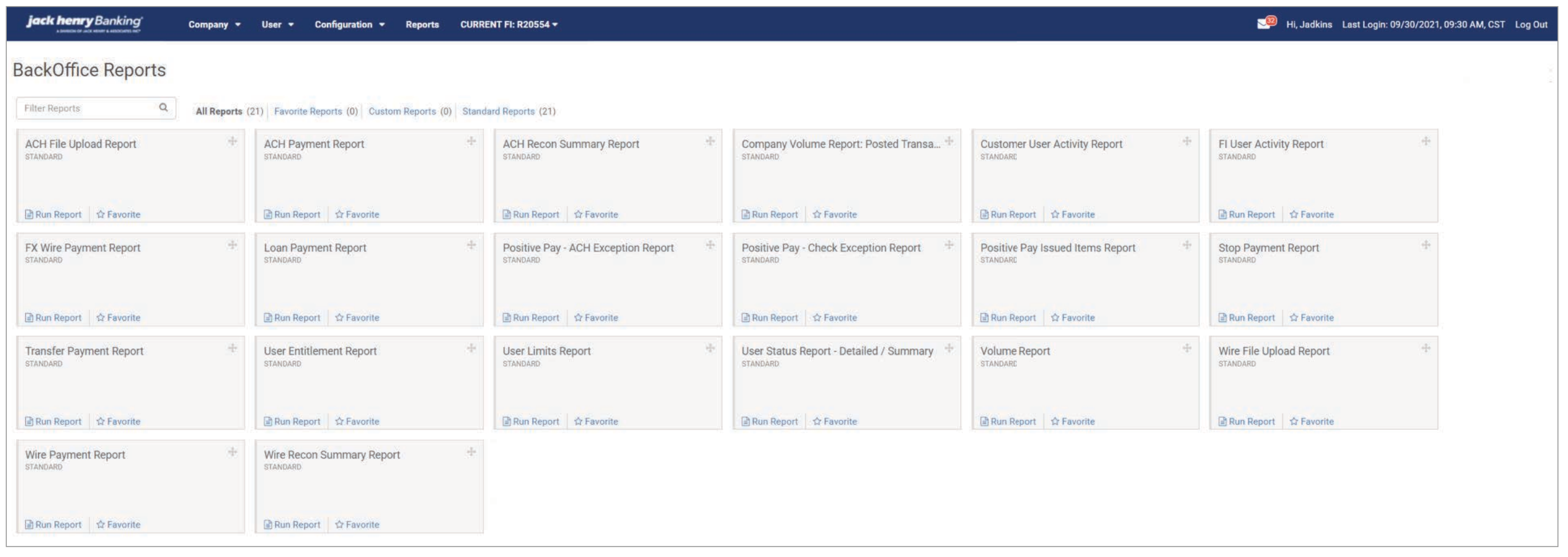
When a user selects Run Report for any of the reports on the Reports Dashboard, no criteria will be pre-selected in the filter. The following message will display when first navigating to the page: _Please select filter preferences and click Run Report _.
Reports Dashboard
All Reports will display all reports on the dashboard, which includes all standard reports and custom reports. Users can toggle to Favorite Reports, Custom Reports or Standard Reports. Reports will display in alphabetical order; however, users can arrange the tiles in their preferred order using the drag and drop feature.
Horizontal Search and Filter
- Vertical verbiage on the flyout experience is flattened in a horizontal format to be more intuitive
- Filter information can be expanded or collapsed with a control that is easily located in the top left corner of the filter itself
- Drop-down menu design
- ADA compliant
Action Bar Icons
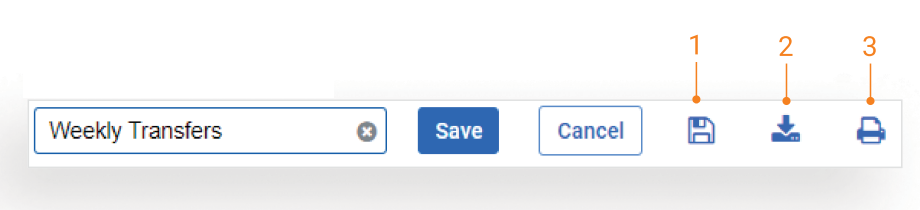
- Select Save to open the Save Report dialog box. Enter a report name and select save to make the report available on the Reports Dashboard.
- Users can download report results in CSV or PDF formats using the download icon.
- The print option icon will print the current page.
Date Picker
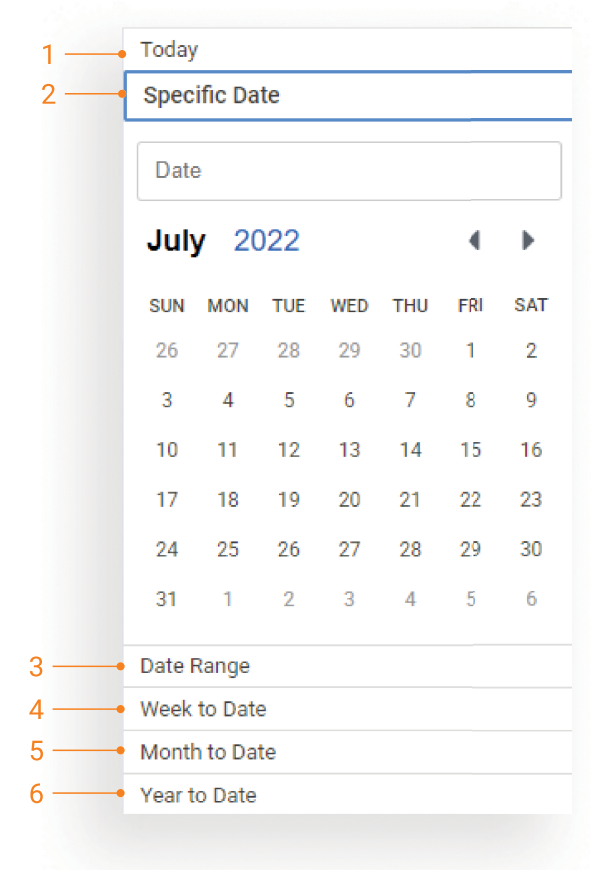
When a user selects a date option, they will be able to use the calendar to select eligible dates. Please refer to this for all reports that have a Date, Period or Activity filter.
Date Options:
- Today
- Specific Date
- Date Range
- Week to Date - Start Date begins with a Sunday date of the current week
- Month to Date - Start Date begins with the first day of the current month
- Year to Date - Start Date begins with the first day of the current year
Configuration
File Upload Report
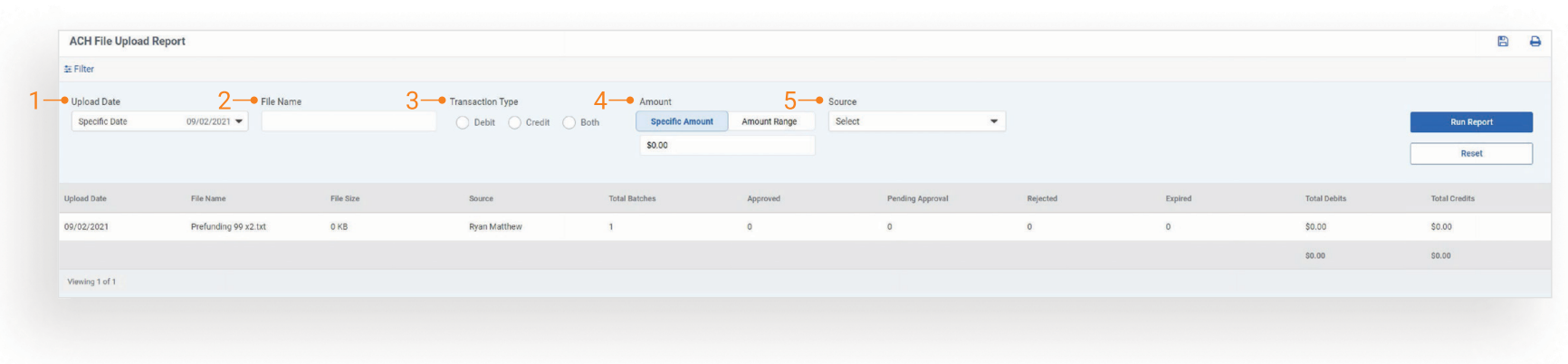
Filter Definitions
-
Upload Date
-
File Name
-
Transaction Type:
- Debit
- Credit
- Both
-
Amount: Will search for a specific amount or an amount range.
-
Source: Company Name - User Name will be displayed in the dropdown.
ACH Payment Report
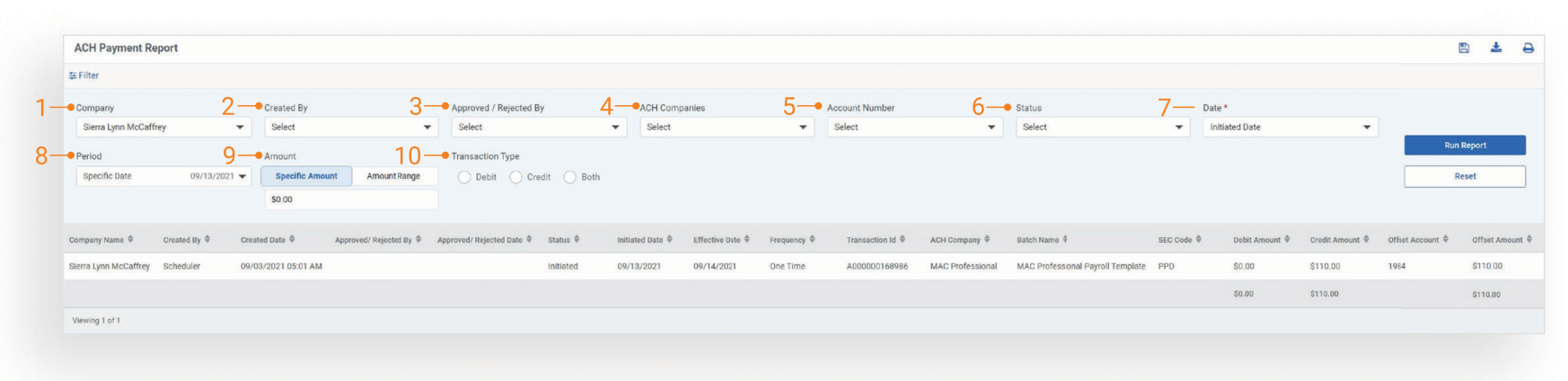
Filter Definitions:
-
Company: List of all companies in an Active or Inactive status.
-
Created By: Company Name - User Name will be displayed in the dropdown. This field is the user who created the payment.
-
Approved / Rejected By: Company Name - User Name will be displayed in the dropdown. This field is the last user to approve or reject the payment.
-
ACH Companies: (ACH Company Name -Company ID-SEC Type) List of ACH companies for the selected company or companies.
-
Account Number: Debit Account Number.
-
Status
Status options include the following:
- Approval Rejected
- Canceled
- Deleted
- Expired
- Failed
- ending Approval
- Scheduled
- Uninitiated
- Date
Selection determines which date is used for searching:
- Created Date
- Initiated Date
- Effective Date
-
Period
-
Amount: Will search Debit Amount, Credit
Amount and Offset Amount for a specific amount or an amount range.
- Transaction Type:
- Debit
- Credit
- Both
ACH Recon Summary Report
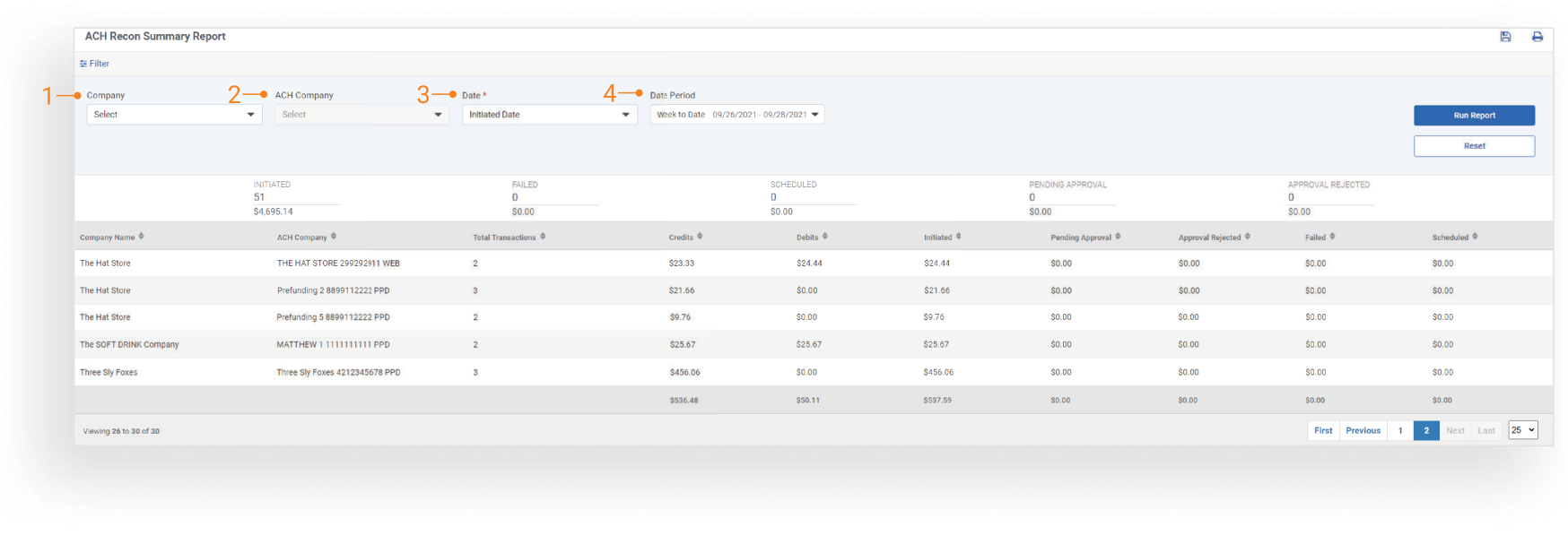
Filter Definitions
-
Company: List of all companies in an Active or Inactive status
-
ACH Company: (Name - Company ID - Sec Type) List of all ACH companies for the selected companies.
-
Date:
- Created Date
- Initiated Date
- Effective Date
- Date Period
Company Volume Report
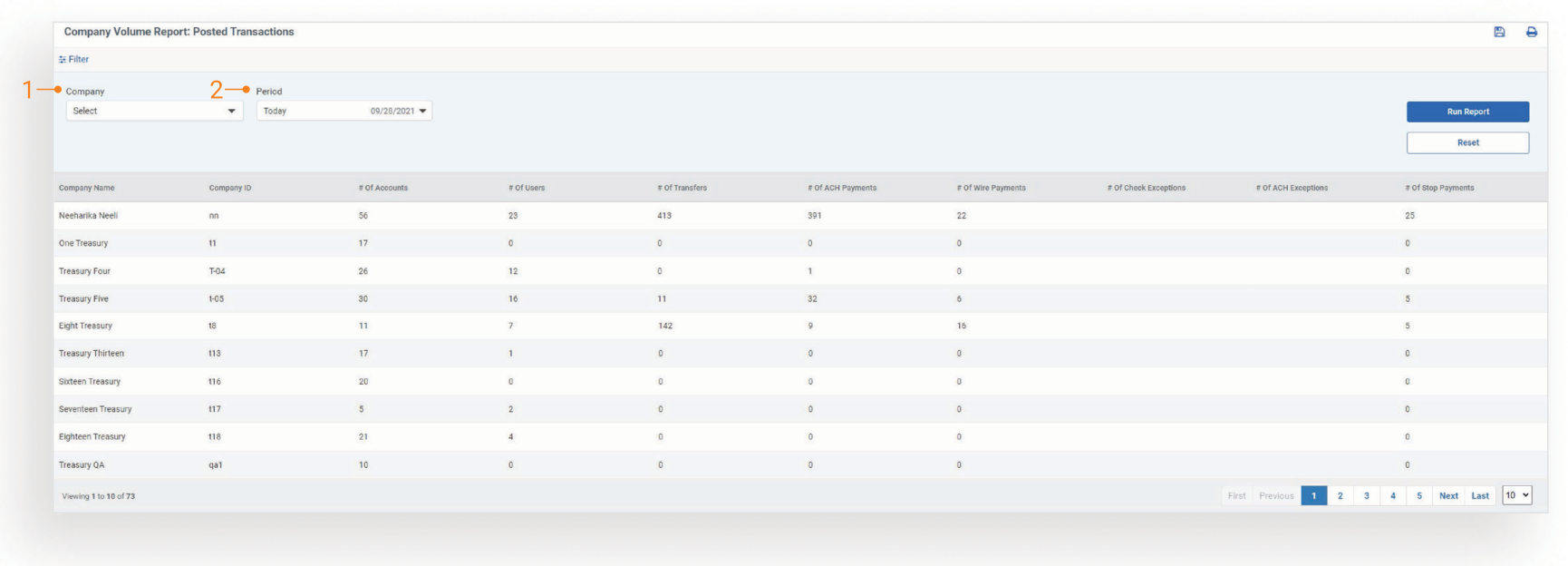
Filter Definitions
-
Company: List of all companies in an Active or Inactive status
-
Period
Customer User Activity Report
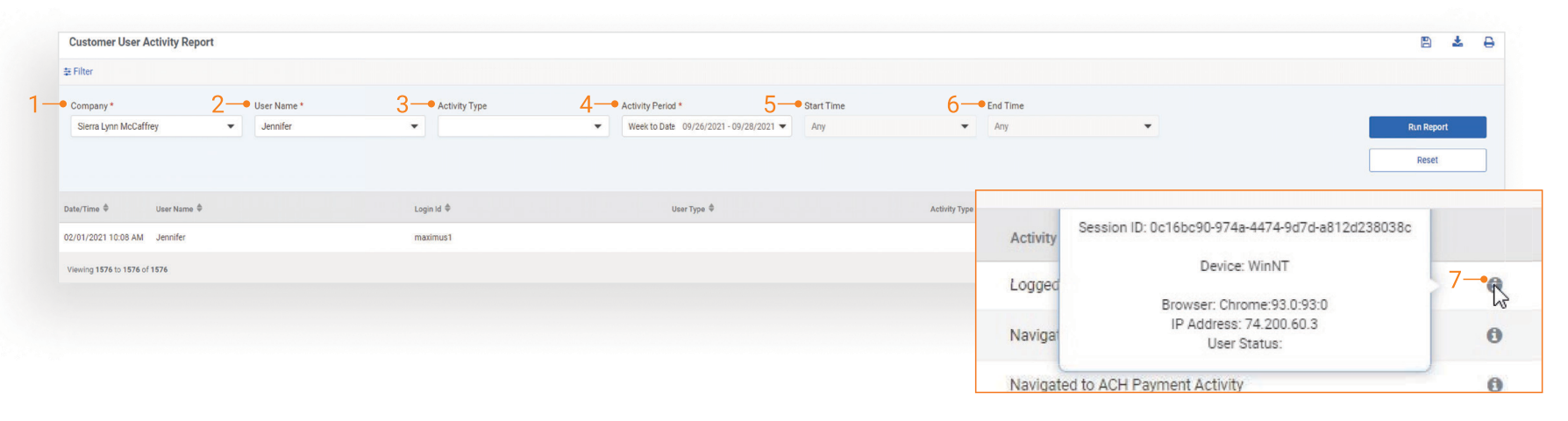
Filter Definitions
-
Company: List of all companies in an Active or Inactive status
-
Users: User Name will be displayed in the dropdown. This field is a list of all channel users for the selected company.
-
Activity Type:
- Account
- Account Reconciliation Reporting
- ACH
- Admin
- Dashboard
- Login
- Navigating
- Positive Pay
- Profile and Notification
- Reporting
- Transfer
- Wire
- Stop Payment
- Transaction
-
Activity Period
-
Start Time
-
End Time
-
Click information icon to display the following details:
- Session ID
- Device
- Browser
- IP Address
- User Status
FI User Activity Report
Filter Definitions
-
Users: User Name - User ID will be displayed in the dropdown. This field is a list of all Back Office users.
-
Activity Period
- Today
- Specific Date
- Date Range
- Week to Date
- Month to Date
- Year to Date
-
Start Time
-
End Time
-
Activity Keyword
-
Click the Information icon to get session ID, device, and browser details.
FX Wire Payment Report
Filter Definitions
-
Company: List of all compa nies in an Active or Inactive status
-
Period
-
FX Wire Company: List of all wire companies
-
FX Wire Amount USD: Will search Wire Amount USD for a specific amount or an amount range.
Loan Payment Report
Filter Definitions
-
Company: List of all companies in an Active or Inactive status.
-
Created By: Company Name - User Name will be displayed in the dropdown. This field will list the user who created the payment.
-
Approved / Rejected By: Company Name - User Name will be displayed in the dropdown. This field is the last user to approve or reject the payment.
-
Status Options:
- Approval Rejected
- Canceled
- Expired
- Failed
- Pending Approval
- Scheduled
- Submitted
- Payment Options:
- Principal Only
- Regular Payment
-
Amount: Will search for a specific amount or an amount range.
-
Date Period
Positive Pay - ACH Exception Report
-
Company: List of all companies in an Active or Inactive status.
-
Decision By: Company Name - User Name will be displayed in the dropdown. This field is the user who created the payment.
-
Decision Status:
- Pay
- Return
- No Decision
-
Account Number: List of all accounts.
-
Posted Date
-
Amount: Will search for a specific amount or an amount range.
Positive Pay - Check Exception Report
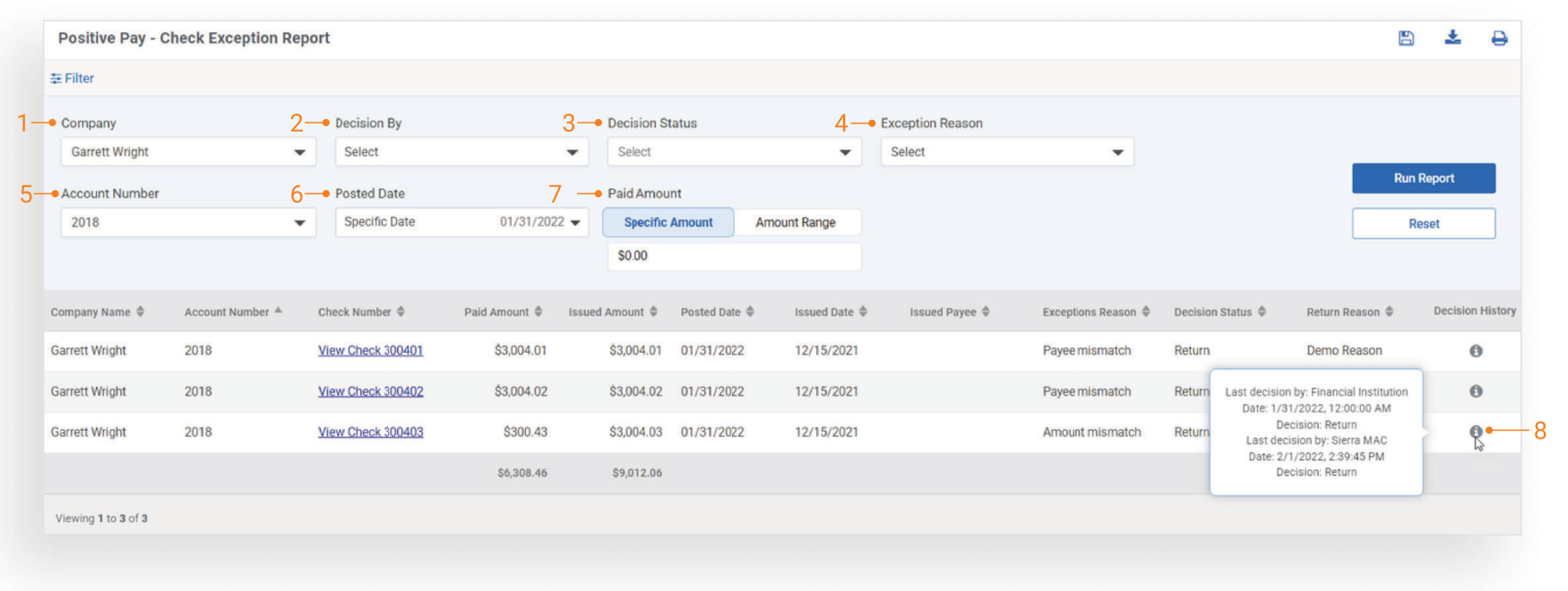
Filter Definitions
-
Company: List of all companies in an Active or Inactive status.
-
Decision By: List of all eligible users for the selected company.
-
Decision Status:
- Pay
- Return
- Exception Reason:
- Account Mismatch
- Dormant Item
- Duplicate Item
- Maximum Amount Exceeded
- Paid item without issue (post all)
- Paid without issue (post none)
- Payee mismatch
- Stale dated item
- Stop payment
- Void Item
- Zero/Blank serial number
-
Account Number: List of eligible accounts for the selected company.
-
Posted Date
-
Paid Amount: Will search the paid amount using a specific amount or an amount range.
-
Click the Information icon to display the following:
- Last decision by
- Date
- Decision
Positive Pay Issued Items Report
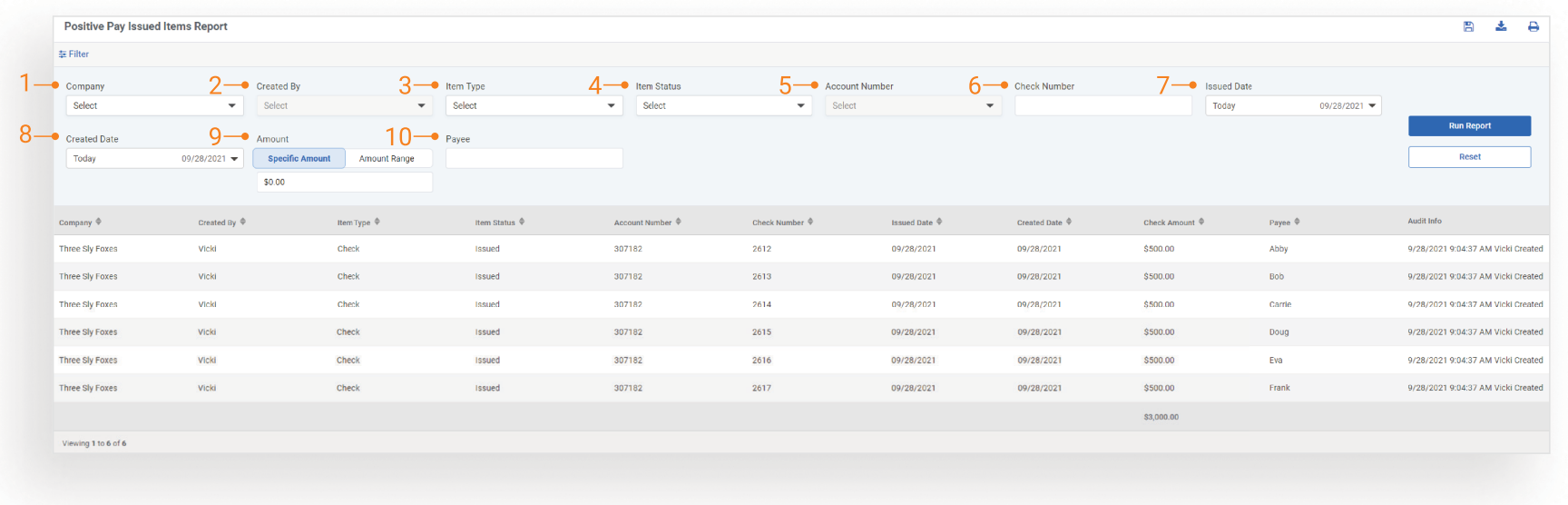
Filter Definitions
-
Company: List of all companies in an Active or Inactive status.
-
Created By: Company Name - User Name will be displayed in the dropdown. This is the user who created the payment.
-
Item Type:
- Check
- Void
- Item Status
Status options include:
- Cleared
- Deleted
- Dormant
- Issued
- Returned
- Stale Date
- Stop Pay
- Void
-
Account Number: Debit account number
-
Check Number
-
Issued Date
-
Created Date - Default will be today’s date.
-
Amount: Will search for a specific amount or an amount range.
-
Payee
Stop Payment Report
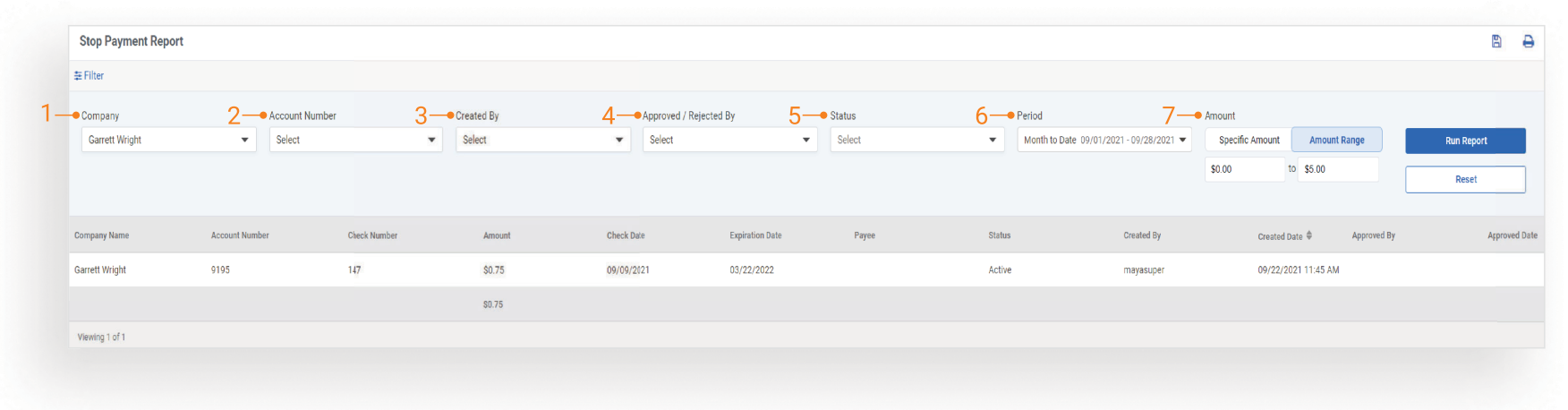
Filter Definitions
-
Company: List of all companies in an Active or Inactive status.
-
Account Number: This is the account number the stop payment report created is for.
-
Created By: Company Name - User Name will be displayed in the dropdown. This field is the user who created the stop payment.
-
Approved / Rejected By: User name will be displayed in the dropdown. This field is the last user to approve or reject the stop payment.
-
Status Options:
- Active
- Approved
- Canceled
- Expired
- Pending Approval
- Rejected
-
Period
-
Amount: Will search for a specific amount or an amount range.
Transfer Payment Report
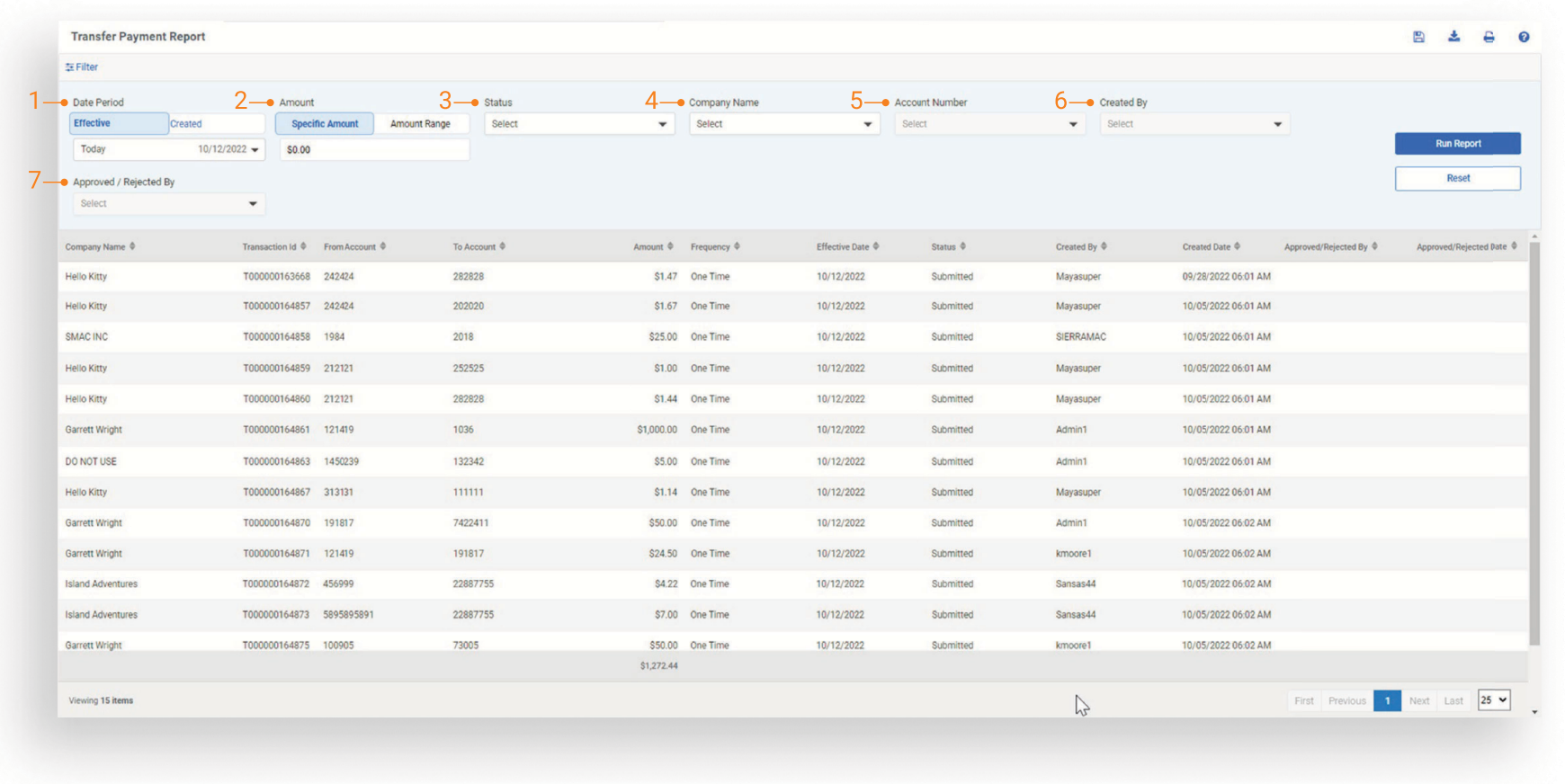
The New Information Icon in the top-right corner serves as an online user guide for the Transfer Payment Report and provides information surrounding the report.
Filter Definitions
-
Date Period: Date period toggle between Effective Date or Created Date. Default will be effective date. Selection of effective date will provide the ability to search on scheduled or future dated transfers.
-
Amount: Will search for a specific amount or an amount range.
-
Status:
- Approval Rejected
- Canceled
- Expired
- Failed
- Pending Approval
- Scheduled
- Submitted
User Entitlement Report

Filter Definitions
-
Company: List of all companies in an Active or Inactive status.
-
Users: Company Name - User name will be displayed in the dropdown. This field is a list of all channel users.
-
Product Options:
- ACH
- Bill Pay
- Electronic Documents
- Foreign Currency Wire
- Positive Pay
- Remote Deposit Capture
- Reporting
- Stop Payment
- Transfer
- Wire
-
Accounts: List of all enabled accounts
-
Entitlements: List of all user entitlements
-
ACH Companies: List of all ACH companies
-
Created By: Company Name - User name will be displayed in the dropdown. This field is the user who added the entitlement.
-
User Status Options:
- Pending Approval
- Edited
- New FI Pending Approval
- Enrolled
- Not Enrolled
- Active
- Inactive
- Deleted
- Locked
- Locked - OOB
User Limits Report
Filter Definitions
-
Company: List of all companies in an Active or Inactive status.
-
Users: Company Name - User name will be displayed in the dropdown. This field is a list of all channel users.
-
Products:
- ACH
- Foreign Currency Wire
- Transfer
- Wire
-
Accounts: List of all enabled accounts.
-
ACH Companies: List of all ACH companies.
User Status Report - Detailed/Summary
Filter Definitions
-
Company: List of all companies in an Active or Inactive status.
-
Users: Company Name - User name will be displayed in the dropdown. This field is a list of all channel users.
-
User Status Options:
- Pending Approval
- Edited
- New
- FI Pending Approval
- Enrolled
- Not Enrolled
- Active
- Inactive
- Deleted
- Locked
- Locked - OOB
Volume Report
Filter Definitions
- Company: List of all companies in an Active or Inactive status.
Wire File Upload Report
Filter Definitions
-
Company: List of all companies in an Active or Inactive status.
-
File Name
-
Uploaded By: Company Name - User Name will be displayed in the dropdown.
-
Amount: Will search for a specific amount or an amount range.
-
Upload Date
-
Click the View hyperlink to view a list of wires included in the selected file.
Wire Payment Report
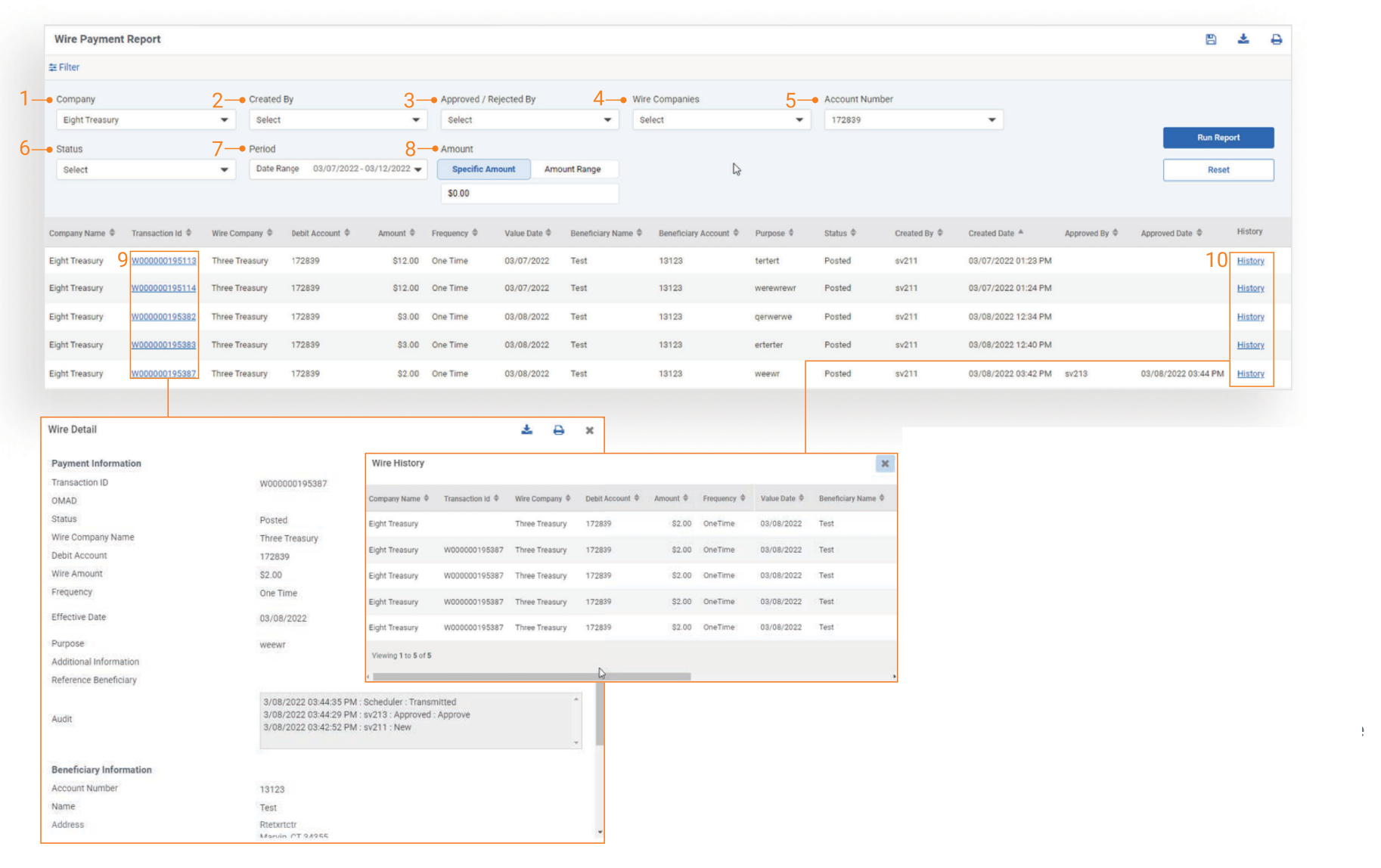
Filter Definitions
-
Company: List of all companies in an Active or Inactive status.
-
Created By: Company Name - User Name will be displayed in the dropdown. This field is the user who created the payment.
-
Approved/Rejected By: Company Name - User name will be displayed in the dropdown. This field is the last user to approve or reject the payment.
-
Wire Companies: List of wire companies for the selected company or companies.
-
Account Number: Offset Account Number
-
Status Options:
- Approval Rejected
- Canceled
- Deleted
- Expired
- Failed
- Initiated
- Pending Approval
- Scheduled
- Uninitiated
-
Period
-
Amount: Will search for a specific amount or an amount range
-
Click the Transaction ID hyperlink to view the payment detail
-
Click the History hyperlink to view audit entries for the payment
Wire Recon Summary Report
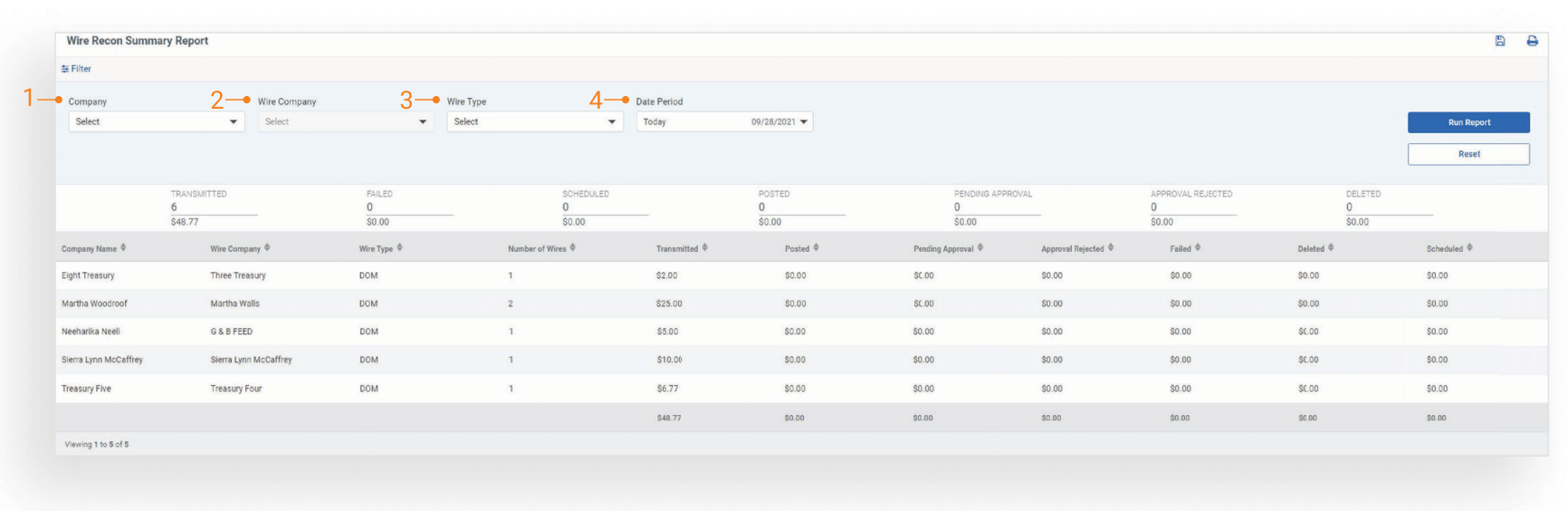
Filter Definitions
-
Company: List of all companies in an Active or Inactive status.
-
Wire Company: List of all wire companies for the selected Treasury Management companies.
-
Wire Type:
- Domestic
- FX
- Date Period
ACH Notification of Change Report
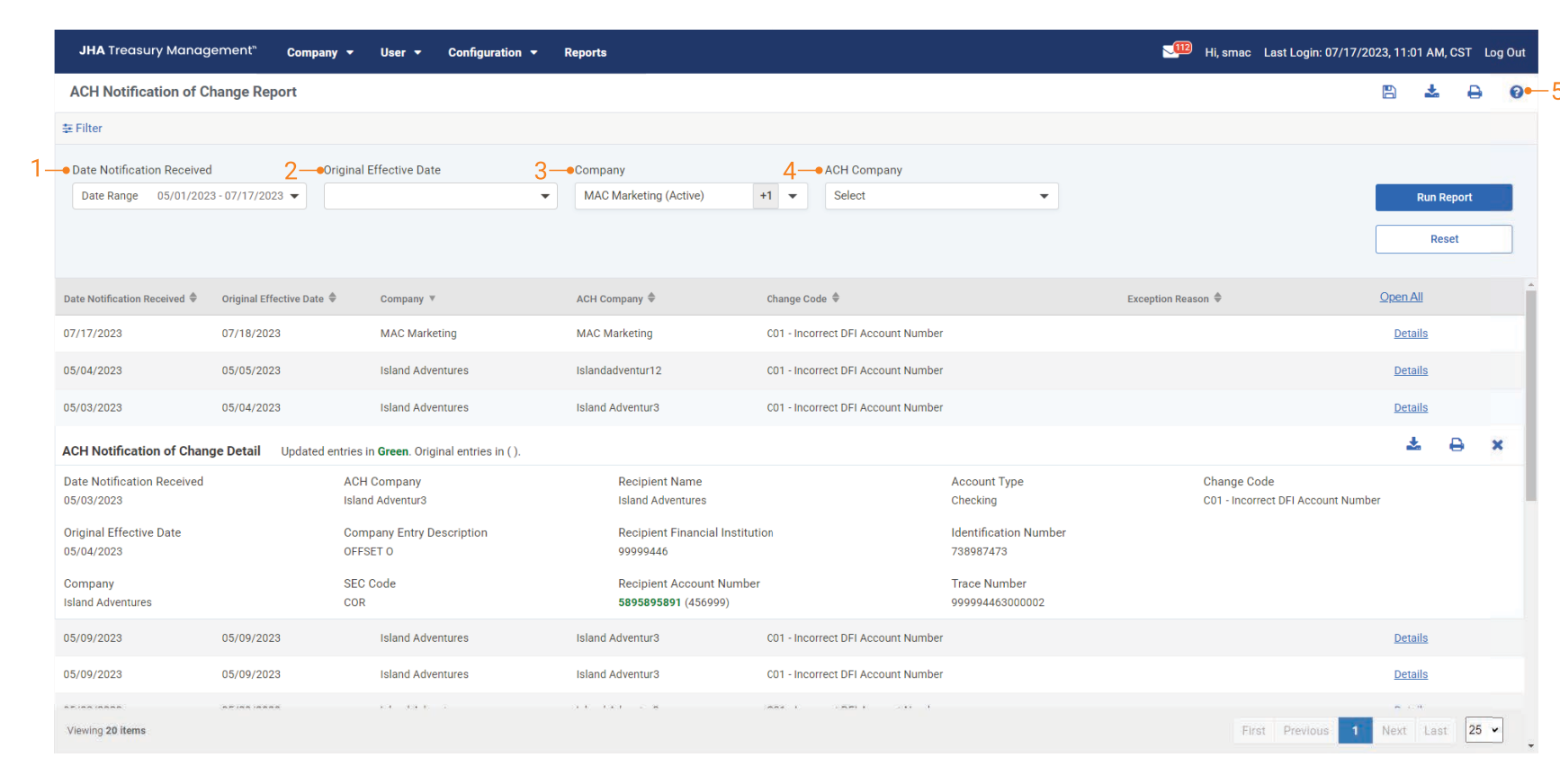
Filter Definitions
-
Date Notification Received
-
Original Effective Date
-
Company: List of all companies in an Active or Inactive status.
-
ACH Company: List of ACH companies for selected company or companies.
-
Information Icon: Serves as an online user guide for the ACH Notification of Change Report and provides information surrounding the report.
ACH Return Report
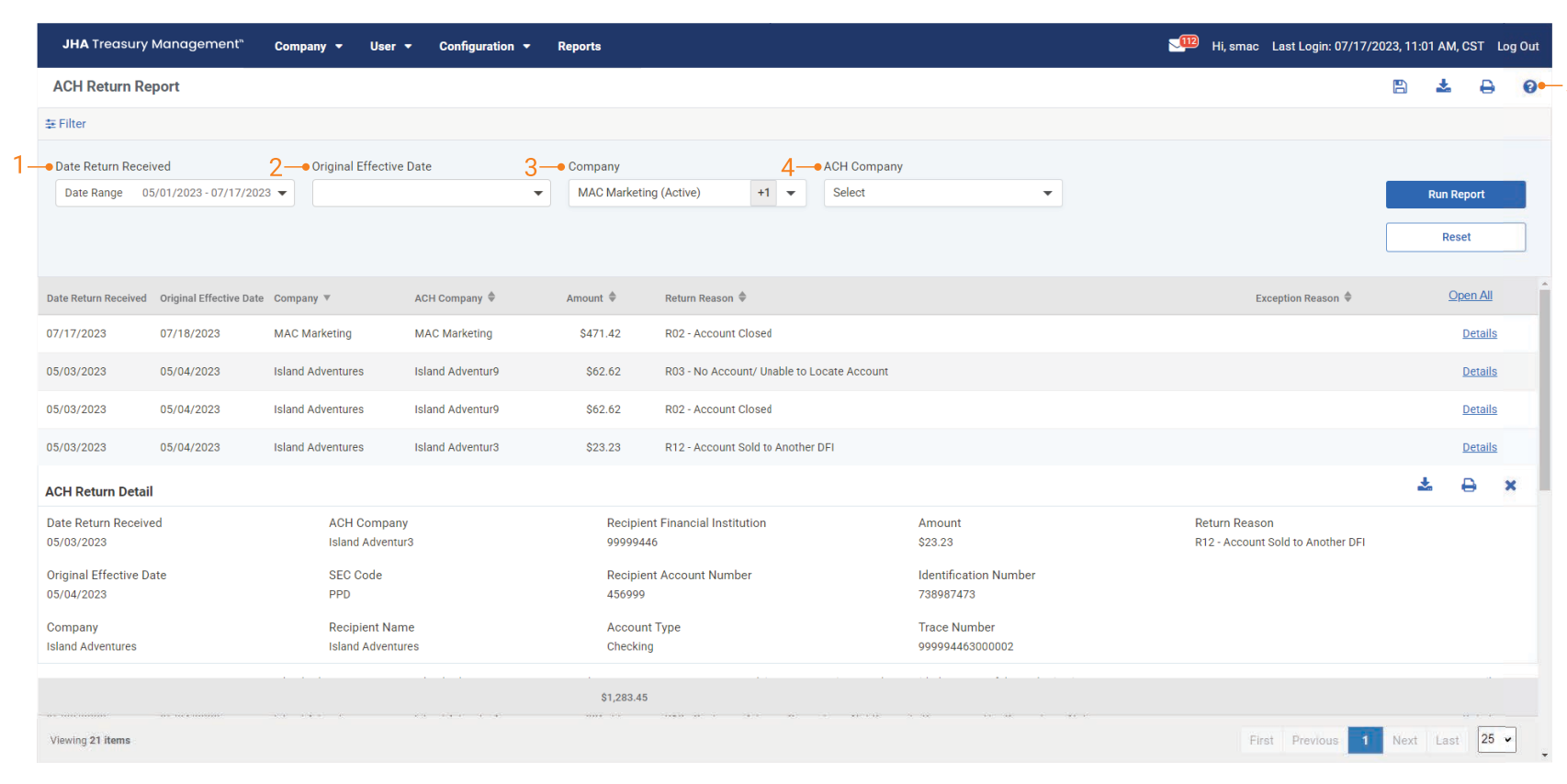
Filter Definitions
-
Date Notification Received
-
Original Effective Date
-
Company: List of all companies in an Active or Inactive status.
-
ACH Company: List of ACH companies for selected company or companies.
-
Information Icon: Serves as an online user guide for the ACH Notification of Change Report and provides information surrounding the report.